

Risk Register
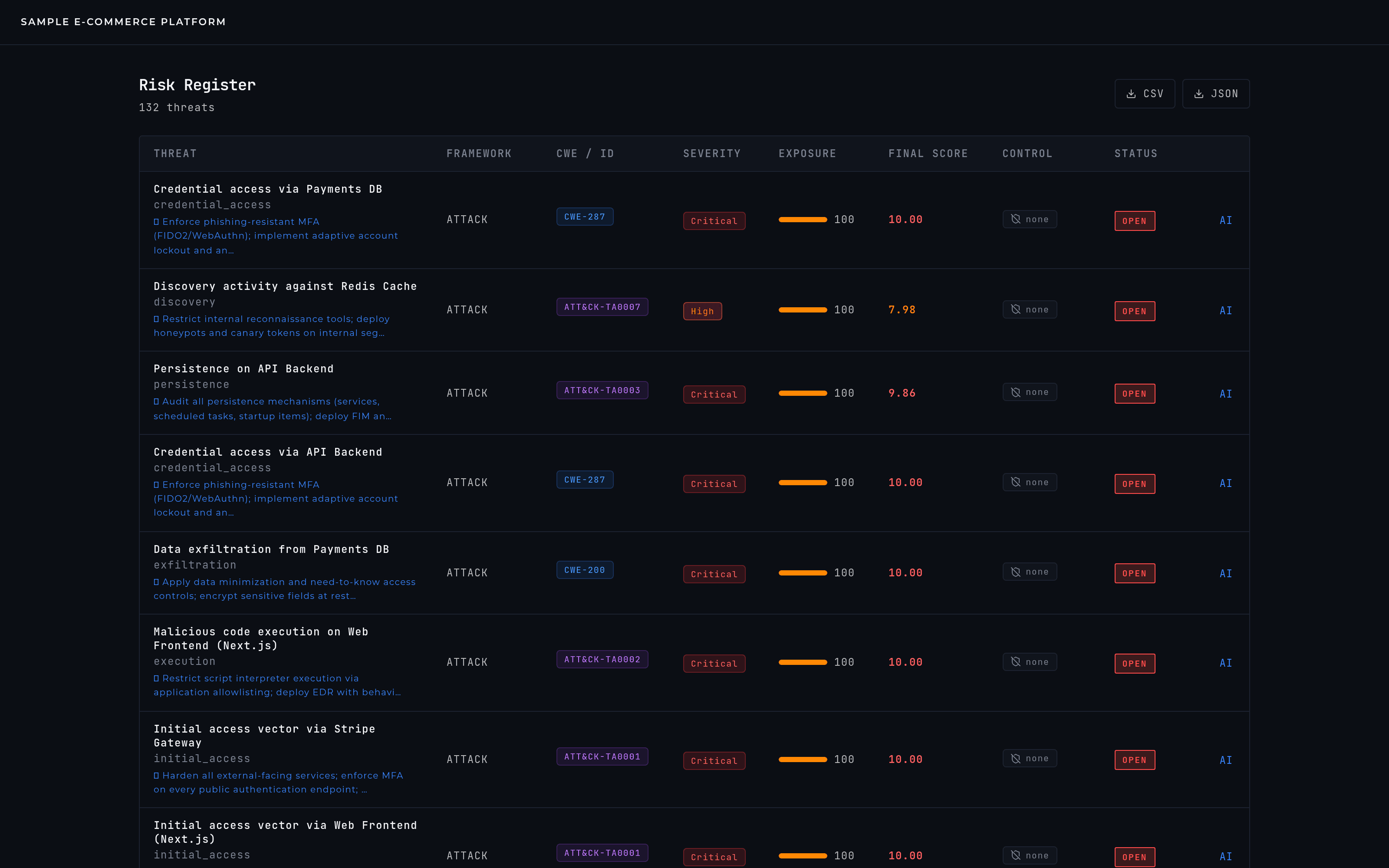
The risk register is the full inventory of a project's threats, most recent first — the screen for seeing how exposed the system is at a glance, not for digging into one specific finding.
What you see
One row per threat: what it is, which framework(s) confirmed it, its severity, its exposure score, whether it has a control linked to it, and its current treatment status. Nothing here is paginated or hidden — it's every threat in the project, most recent first.
Treatment states
- OPEN
- identified, nothing done about it yet — counts in full toward the project's score.
- MITIGATED
- an active control covers it — its contribution to the score drops sharply.
- ACCEPTED
- a conscious decision to tolerate the risk — it stays visible, but down-weighted in the rollup rather than driving the score at full strength.
- TRANSFERRED
- covered by insurance or an external party — most, but not all, of the exposure now sits with someone else.
Where you actually change status
Status changes happen in Threat Intelligence, not on this screen — the register is a read view. Changing the status there updates every instance of that same de-duplicated finding across every framework that caught it, and triggers a live rescore; the register can take a few seconds to reflect the new number.
Getting the data out
CSV and JSON export cover the base fields — title, framework, category, likelihood, impact, score, status. The enriched view you see on screen (exposure, full severity, control coverage) isn't in that export; for a document that includes it, generate a Report instead.